PhotoSpiralysis: the Droste effect from any photo, in your browser
PhotoSpiralysis is a free online Droste effect generator. Give it a photo and it turns the picture into an infinite, recursive spiral — the image containing a smaller copy of itself, which contains a smaller copy, and so on, twisting inward without end. You tune the effect live and export the result at full resolution, and your photo never leaves your device.
Open PhotoSpiralysis (opens in a new tab)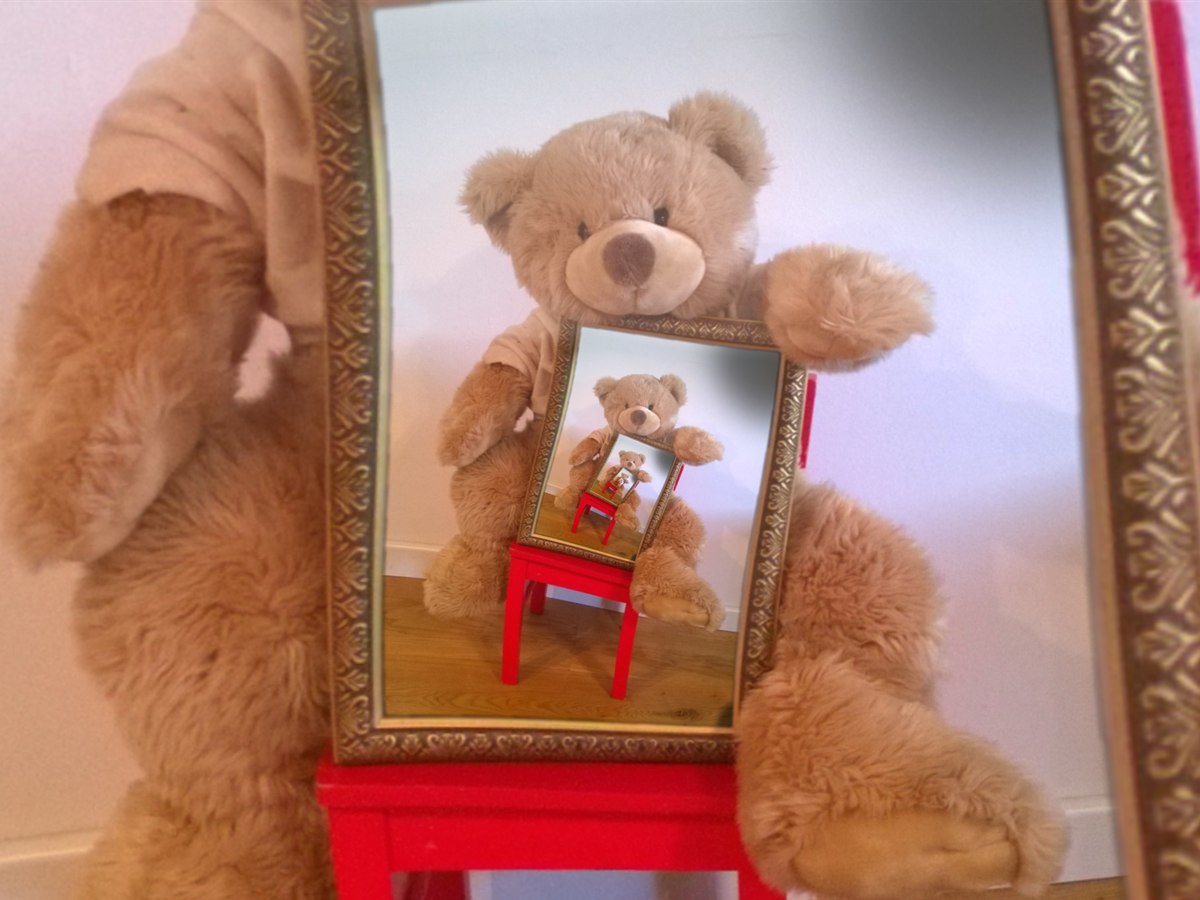
What is the Droste effect?
The Droste effect is a picture that appears inside itself. It takes its name from the Dutch cocoa maker Droste, whose tins from 1904 showed a nurse carrying a tray with a tin of Droste cocoa on it — a tin showing the same nurse, carrying the same tray, on and on until the print was too small to follow. The effect is also called mise en abyme, and it has been used on record sleeves, in film and in paintings for over a century.
The spiral form is a twist on that idea, in the literal sense. Rather than the copies sitting squarely inside one another, each is rotated a little as it shrinks, so the recursion winds inward in a smooth spiral. M. C. Escher’s Print Gallery of 1956 is the famous example; the mathematics behind it — a conformal mapping that turns a straight repetition into a spiralling one — was worked out in full by Hendrik Lenstra and Bart de Smit in 2003. PhotoSpiralysis applies that transformation to your own photographs.
How PhotoSpiralysis makes one
- Open a photo. It is read straight into your browser, and stays there.
- Mask the part that repeats. The effect needs a region of the picture to feed back into itself — a frame, a mirror, a screen, a window — and you shape that region with a circle, a freeform polygon or a colour key, each with a soft, feathered edge so the join disappears.
- Tune it live. Zoom and rotation set how tightly the spiral winds and how quickly it shrinks. Every slider updates the picture as you drag it; there is no render button to press and no waiting.
- Export. A full-resolution PNG, made in seconds, in the browser tab you are already in.
Everything stays on your device
The whole effect is computed locally, by your browser, on your own machine. No photo is ever uploaded, nothing is stored, and there is no account. The privacy policy says the same thing at slightly greater length.
Getting a good result
- The classic Droste photo has something frame-shaped in it for the recursion to live inside: a picture frame, a mirror, a phone or television screen, a doorway, a window. Hold up a mirror, as the bear does above, and you have the picture.
- The mask edge is where the copy joins the original, so run it along a real edge in the photo and let the feathering hide the seam.
- Start from the largest photo you have. Each turn of the spiral is a smaller copy of the last, and a high-resolution source gives you more turns before the detail runs out.
Questions
Is PhotoSpiralysis free?
Yes. It is free to use, with no watermark on your export and no account to make. There is an optional tip button if you would like to support it.
Do I need to install anything?
No. It runs in a current browser — Chrome, Edge, Firefox or Safari — on a desktop, laptop, tablet or phone.
Which languages is it available in?
English, Spanish, French, German, Italian, Chinese, Japanese and Korean, chosen from the language menu on the site.
Where is the app?
On its own site, at photospiralysis.com. The button at the top of this page takes you straight to it.
Ready? Open PhotoSpiralysis (opens in a new tab), or go back to the front page for the other app: Fractalysis, a deep-zoom Mandelbrot set explorer.